
Ever submit an email because something broke, then wonder where it went next? That’s the everyday magic of ticketing systems. They turn your request into a trackable ticket, usually with a ticket number, status, and a clear owner.
You see them in places that matter: customer support, concert entry, train bookings, and IT help at work. They keep teams organized, so nobody loses your message in a crowded inbox.
Once you know the basic flow, it’s easier to spot what’s happening behind the scenes. Next, you’ll see the simple steps that power most ticketing systems, from inbox to closure.
The Simple Step-by-Step Process That Powers Ticketing Systems
Most ticketing systems follow a similar path. They’re software that takes incoming requests and converts them into organized work units. Then it routes those work units to the right people.
To make it real, think of a ticket like a library checkout card. The details stay with the card, and the staff updates it until the issue is solved. In support teams, this helps create accountability and speed.
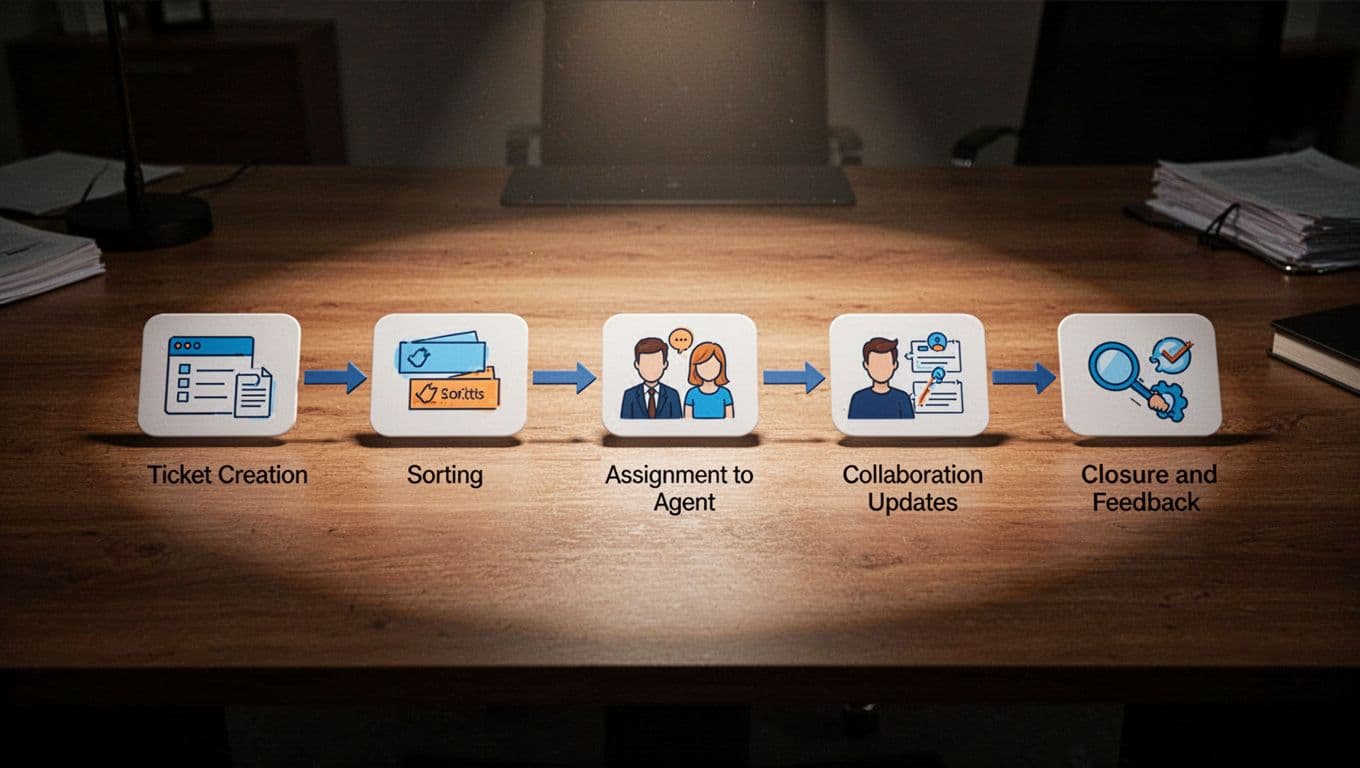
Here’s the five-step workflow, in plain language:
- Create the ticket: Your request comes in through email, chat, a web form, or an app. The system pulls key details like the requester, issue type, and time.
- Sort and rank: Labels and priority rules kick in. Many systems also detect intent (billing, outage, refund) and severity.
- Assign automatically: The ticket routes to the right team or person, based on rules and past patterns.
- Work the ticket: Agents add notes, request info, and communicate inside the same ticket thread.
- Close and archive: When the fix lands, the system closes the ticket, asks for feedback, and saves data for reports.
You can picture the path like this:
Request → Ticket # → Labels/Priority → Assignment → Updates → Close + Feedback
A good way to understand ticketing systems is to compare how vendors describe them. For example, Salesforce explains support ticketing as software that captures and manages requests through to resolution. See what a support ticketing system is.
This process brings real benefits. You get fewer lost details, fewer duplicate threads, and faster fixes because the next person has context.
Step 1: Turning Your Request into a Ticket
Step 1 is where most of the value starts. A ticketing system doesn’t wait for someone to type everything manually. Instead, it captures your request and packages it into one place.
In daily life, “incoming request” can look like many things:
- You email a company about a broken order.
- You chat with a support agent from your phone.
- You submit a form on a website.
- You tap an app button that says “Report a problem.”
Then the system extracts the essentials. It stores your contact info, the message content, and any order or account details you included. It also records the timestamp and the channel (email, chat, or form). That matters because it helps teams measure response times later.
Most systems also try to standardize what you wrote. For example, they may detect the topic from keywords. Then they attach default labels and a ticket type. You don’t have to use perfect wording.
The goal is simple: one request becomes one ticket with the right details. After that, sorting and routing can happen without guesswork.
If you’ve ever thought, “Did they even see my message?” this is the answer. The ticket exists. It has a status. Someone owns it.
And when your request stays in one ticket thread, agents don’t need to ask you the same questions twice.
Steps 2 and 3: Sorting, Ranking, and Smart Assignment
Once a ticket exists, the system decides what to do with it next. That’s Step 2 (sort and rank) and Step 3 (assign).
Sorting usually means adding labels. Labels can reflect things like:
- request type (refund, login issue, shipping delay)
- product area (billing, hardware, service outage)
- urgency (time-sensitive events)
- customer group (business account vs. consumer)
Ranking usually means priority. Some systems use rules like “outage tickets go first.” Others use simple scoring based on keywords or message patterns. In many setups, angry or confused messages rise faster because they often signal bigger impact.
Then comes assignment. Instead of waiting for a human to read everything, ticketing software routes it based on rules. For example, an “invoice” label may send the ticket to a billing team. A “printer offline” label may go straight to workplace IT.
This is where daily life feels smoother. You don’t get bounced between inboxes. You also don’t wait while someone forwards your message.
Because the system assigns work early, teams can start action sooner. And because labels are consistent, teams can pull reports later.
For teams that want to reduce misroutes, many help desk platforms explain the value of ticketing that centralizes requests and automates handling. You can also see how common these ideas are in help desk tooling, such as Zendesk’s overview of ticketing systems.
Steps 4 and 5: Working the Ticket to a Happy Close
Now the real “work” starts. Step 4 is the collaboration layer. Step 5 is the cleanup layer that turns resolution into learnings.
What agents do inside a ticket
Inside a ticket, agents keep everything in one thread. That means updates, questions, screenshots, and internal notes stay together.
Instead of searching old emails, the next agent can read the ticket history. That helps when tickets switch owners due to time zones or workload.
Agents also communicate without losing context. For example, they might:
- ask for extra details
- confirm troubleshooting steps
- send a replacement code
- update estimated delivery time
- log what fixed the issue
In many ticketing systems, templates and suggested replies help too. The system can suggest a response based on similar tickets or a knowledge base. So agents spend less time rewriting the same answer.
When tickets close
Step 5 closes the loop. Once the issue is resolved, the system marks the ticket as closed. Then it may ask for feedback (a rating or quick comment).
Finally, it archives the ticket data. That archived history fuels reports like:
- top issue categories
- first response time trends
- agent workload by team
- recurring problems
That’s why ticketing feels invisible when it works. Behind the scenes, it turns chaos into trackable improvement.
Spot Ticketing Systems in Your Everyday World
Ticketing systems show up in ways you probably take for granted. Once you notice the patterns, you’ll see how the same five steps repeat across different industries.
Next, you’ll see how ticketing looks in support, events, transportation, and workplace IT.
Customer Support: From Frustrated Email to Quick Fix
Picture this: you order something online, and the box arrives damaged. You email customer support with photos and your order number.
Soon, you get a reply that includes a ticket number. That’s Step 1, your request becoming a trackable ticket. Then the system tags it as a “damaged item” issue and sets a priority. That’s sorting and ranking.
Next, the ticket gets assigned to the right team. Maybe it routes to returns, not general questions. That’s Step 3.
After assignment, you see updates in your inbox because all agent notes and replies live inside the same ticket thread. That’s Step 4, the collaboration part. If they ask for a replacement preference, you reply once. The agent sees it in context.
Finally, once a new item ships, the ticket closes and the system records the outcome. That closure helps the company spot repeat shipping problems.

Events: Grabbing That Concert Spot Without the Hassle
Ticketing systems run events like a well-run door team. Here’s how it often feels from the attendee side.
You buy a ticket online. Then your phone gets an email or app entry with a QR code. That QR code is more than a barcode, it’s a ticket identifier tied to a booking. That’s Step 1 again, your purchase turned into a ticket record.
At the venue, staff scan the code at the entrance. If it’s valid and not already used, the system marks it as checked in. Meanwhile, anti-fraud rules help prevent duplicates or fake codes. Sorting and ranking happen behind the scenes too, like separating general admission from VIP.
If something goes wrong, like a wrong name or a denied scan, staff can open a support ticket for that specific issue. The ticket then routes to the right person, often fast.
Later, organizers use the ticket data for reports, like attendance counts and entry bottlenecks. That’s Step 5, closure and archiving for learnings.
If you’re curious how event ticketing platforms handle these flows, you can compare options in lists like best event ticketing systems for 2026.

Transportation: Smooth Rides from App to Gate
Transportation ticketing usually hides in a phone app. Still, it follows the same logic.
You book a train or bus ticket in an app. Then the app generates a digital ticket code tied to your trip. That’s Step 1, your booking becoming a record with identifiers and rules.
Next, the system sorts your ticket by things like route, seat, time, or eligibility. It may also rank tickets for scanning speed at stations. That’s Step 2.
When you arrive, you show the code to a scanner or gate reader. If the ticket matches and hasn’t expired, the system marks it as used. That’s the operational version of “assignment and work” in ticket systems.
If problems happen, like “ticket not found,” support staff or automated checks open a case. That becomes a ticket for human follow-up. Then agents update notes and outcomes in one place, so the same trip issues don’t repeat in different channels.
Finally, the system archives the trip and resolution details. It helps agencies improve app behavior and spot route problems. That’s Step 5 in transportation form.
If you want to see which transit apps people use for planning and booking, PCMag often shares current picks, like bus and train travel apps.
Work IT Help: Getting Your Printer Back Online Fast
At work, ticketing systems are the fastest way to get “help” that doesn’t waste everyone’s day.
You open your employee portal (or send a request) and report a printer issue. Maybe the printer shows “offline” or keeps jamming. That request becomes a ticket with a printer ID, location, and your contact info. That’s Step 1.
Then the system tags it as an IT support issue and sets priority. A jam on a shared office printer may get higher priority than a personal device. That’s Step 2 and Step 3.
Next, it assigns the ticket to the right IT technician. If the system knows which tech handles that building, it can route it without manual forwarding. That reduces delays.
During Step 4, the IT team updates the ticket with troubleshooting steps. They might note that the driver is outdated, or that a cable needs reseating. They also communicate with you inside the same thread, so you don’t get multiple confusing emails.
Finally, once the printer works, the ticket closes. The IT team records the fix type, so future problems get handled faster. In other words, every solved ticket becomes a lesson.

2026 Trends Making Ticketing Systems Smarter and Faster
Ticketing systems in March 2026 aren’t just organizing messages. They’re helping teams act sooner, with fewer manual steps.
Real-world updates focus on common themes. Support teams want help with routing, draft replies, and predicting when tickets spike. Event and operations teams want better fraud checks and quicker exception handling. IT teams want triage that doesn’t wait for someone to read every message.
Here are the trends showing up most often:
- AI chatbots for first pass help: Bots understand requests in plain language, then draft replies or route to the right team.
- Sentiment sorting: Systems can detect frustration in messages and prioritize those tickets first.
- Answer suggestions for agents: Instead of starting from scratch, agents get likely fixes based on similar history.
- Predictive analytics: Ticketing systems flag recurring issues and forecast ticket volume.
- Auto-rules for update and assignment: Rules can assign, tag, and request missing info automatically.
- Multi-channel intake: Email, chat, social, and app messages can all land in one place.
This doesn’t mean humans disappear. Instead, AI handles the early busywork, so people focus on hard cases.
For a clear explanation of how AI ticketing systems work, see Dust’s guide to AI ticketing systems. It breaks down how automation supports categorization, routing, and resolution.

The daily-life effect is simple. You get help sooner, you repeat yourself less, and your issue moves with a clear owner.
Conclusion
Ticketing systems work the same way across life, from support inboxes to event entrances and workplace IT. A request becomes a ticket, the system sorts and assigns it, and agents update it until the issue closes.
In 2026, AI makes that workflow feel faster. It helps with triage, draft replies, and patterns teams might miss. As a result, fewer problems get stuck in limbo.
Next time you receive a ticket number, watch what happens after that. Your request likely goes through the same steps every time. Would you like to share a recent example of ticketing that helped you, or one that didn’t?